[root@snet102 ~]# cat /etc/fstab
#
# /etc/fstab
# Created by anaconda on Tue Nov 13 14:06:32 2012
#
# Accessible filesystems, by reference, are maintained under '/dev/disk'
# See man pages fstab(5), findfs(8), mount(8) and/or blkid(8) for more info
#
/dev/mapper/vg_rl6u3vanilla-lv_root /                       ext4    defaults        1 1
UUID=2309506a-eed6-413e-b234-0587949c3504 /boot                   ext4    defaults        1 2
/dev/mapper/vg_rl6u3vanilla-lv_swap swap                    swap    defaults        0 0
tmpfs                   /dev/shm                tmpfs   defaults        0 0
devpts                  /dev/pts                devpts  gid=5,mode=620  0 0
sysfs                   /sys                    sysfs   defaults        0 0
proc                    /proc                   proc    defaults        0 0
##
client10:/iscsi1/nfsdata  /nfstest2             nfs     _netdev         0 0
##


[root@snet102 ~]# df -hFnfs
Filesystem            Size  Used Avail Use% Mounted on
client10:/iscsi1/nfsdata
                      2.0G   37M  1.9G   2% /nfstest2
Showing posts with label nfs. Show all posts
Showing posts with label nfs. Show all posts
Saturday, March 30, 2013
How to mount NFS volume at Boot time in Linux?
It seems very basic thing - however, coming from Solaris background, it was always a puzzle why Linux was not able to mount my NFS volumes the way it was mounting in Solaris. Basically, the only difference is "_netdev" keyword - which tells Linux that this device should be mounted AFTER network services are UP. To work around this, I even used a custom run-control script at /etc/rc3.d to mount it later. Now that I found "_netdev" keyword - I know that I am never going to use any workarounds for my NFS volumes. :)


How to find RHEL NFS statistics?
Use following command to get NFS-IO-Statistics::
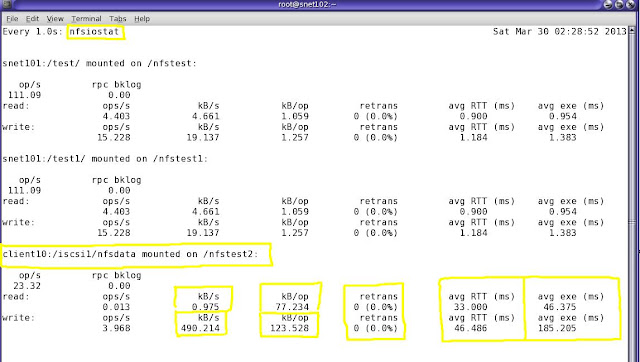
# watch -n 2 'nfsiostat'

Sunday, February 24, 2013
How to find NFS-only process opened by a specific user?
# lsof -N  -u sge  -a
COMMAND     PID USER   FD   TYPE DEVICE    SIZE     NODE NAME
sge_execd  5251  sge  cwd    DIR   0,29    4096  4368270 /mtpt/nfstmp6/eda_spool/server1 (10.20.30.102:/vol/nfstmp6)
sge_execd  5251  sge  txt    REG   0,28 1917054    99454 /mtpt/grid/sge/sge-6.2u5/bin/lx24-amd64/sge_execd (10.20.30.72:/vol/grid)
sge_execd  5251  sge  mem    REG   0,28    8093  1716583 /mtpt/grid/sge/sge-6.2u5/lib/lx24-amd64/libcore.so (10.20.30.72:/vol/grid)
sge_sheph  6220  sge  cwd    DIR   0,29    4096  4520407 /mtpt/nfstmp6/eda_spool/server1/active_jobs/2050265.1 (10.20.30.102:/vol/nfstmp6)
sge_sheph  6220  sge  txt    REG   0,28 3002442    99445 /mtpt/grid/sge/sge-6.2u5/bin/lx24-amd64/sge_shepherd (10.20.30.72:/vol/grid)
sge_sheph  6220  sge    3u   REG   0,29    5454  4520411 /mtpt/nfstmp6/eda_spool/server1/active_jobs/2050265.1/trace (10.20.30.102:/vol/nfstmp6)
sge_sheph  8064  sge  cwd    DIR   0,29    4096 11745026 /mtpt/nfstmp6/eda_spool/server1/active_jobs/1963625.1 (10.20.30.102:/vol/nfstmp6)
sge_sheph  8064  sge  txt    REG   0,28 3002442    99445 /mtpt/grid/sge/sge-6.2u5/bin/lx24-amd64/sge_shepherd (10.20.30.72:/vol/grid)
sge_sheph  8064  sge    3u   REG   0,29    5490 11267154 /mtpt/nfstmp6/eda_spool/server1/active_jobs/1963625.1/trace (10.20.30.102:/vol/nfstmp6)
sge_sheph 11956  sge  cwd    DIR   0,29    4096  8754269 /mtpt/nfstmp6/eda_spool/server1/active_jobs/1217293.1 (10.20.30.102:/vol/nfstmp6)
sge_sheph 11956  sge  txt    REG   0,28 3002442    99445 /mtpt/grid/sge/sge-6.2u5/bin/lx24-amd64/sge_shepherd (10.20.30.72:/vol/grid)
sge_sheph 11956  sge    3u   REG   0,29    3880 13004799 /mtpt/nfstmp6/eda_spool/server1/active_jobs/1217293.1/trace (10.20.30.102:/vol/nfstmp6)
sge_sheph 27134  sge  cwd    DIR   0,29    4096  2680503 /mtpt/nfstmp6/eda_spool/server1/active_jobs/546332.1 (10.20.30.102:/vol/nfstmp6)
sge_sheph 27134  sge  txt    REG   0,28 3002442    99445 /mtpt/grid/sge/sge-6.2u5/bin/lx24-amd64/sge_shepherd (10.20.30.72:/vol/grid)
sge_sheph 27134  sge    3u   REG   0,29    4008  2680507 /mtpt/nfstmp6/eda_spool/server1/active_jobs/546332.1/trace (10.20.30.102:/vol/nfstmp6)
Thursday, June 23, 2011
How to refresh autofs in Linux?
Sometimes my users complain that they can not go to some directories because those directories are coming from automounter. Although same server was able to access the location before but for some reason, autofs daemon got hung/not responding. Here is a quick solution to make it work again:
So, the root cause of this type of hung situation was the presence of extra /etc/mtab~* files. These files are created and could not get removed when an autofs location is accessed becuase sometimes autofs daemon or system is too busy. Manually delete the extra files and the reload autofs server can help.
[root@server-1 ~]# ssh server-061
Last login: Tue Nov 30 13:38:18 2010 from server-1

[root@server-061 ~]# su - unixgeek
su: warning: cannot change directory to /user/unixgeek: No such file or directory

[root@server-061 ~]# ls -la /etc/mtab*
-rw-r--r-- 1 root root 4453 Jun 23 08:58 /etc/mtab
---------- 2 root root    0 Jun 23 09:03 /etc/mtab~
---------- 2 root root    0 Jun 23 09:03 /etc/mtab~30971
---------- 1 root root    0 Jun 23 09:06 /etc/mtab~31065
[root@server-061 ~]# rm -f /etc/mtab~ /etc/mtab~30971 /etc/mtab~31065
[root@server-061 ~]# ls -la /etc/mtab*
-rw-r--r-- 1 root root 4453 Jun 23 08:58 /etc/mtab
[root@server-061 ~]# service autofs reload
Reloading maps
[root@server-061 ~]# su - unixgeek
[unixgeek@server-061 ~]$ logout
[root@server-061 ~]# logout

Connection to server-061 closed.
[root@server-1 ~]#
So, the root cause of this type of hung situation was the presence of extra /etc/mtab~* files. These files are created and could not get removed when an autofs location is accessed becuase sometimes autofs daemon or system is too busy. Manually delete the extra files and the reload autofs server can help.
Subscribe to:
Posts (Atom)

 Posts
Posts


