[/user/johnc] $ ssh -X server1
johnc@server1's password:
Warning: No xauth data; using fake authentication data for X11 forwarding.
Last login: Sat Jun 20 04:58:57 2015 from 10.68.76.230
[johnc@server1 ~]$
[johnc@server1 ~]$ xterm
[johnc@server1 ~]$ xauth list
server1/unix:10  MIT-MAGIC-COOKIE-1  [some output.....]


[johnc@server1 ~]$ sudo -u appuser -H -s
bash-4.1$ xauth add server1/unix:10  MIT-MAGIC-COOKIE-1   [some output.....]
xauth:  creating new authority file /user/appuser/.Xauthority

bash-4.1$ id
uid=1002(appuser) gid=310(dba) groups=310(dba)

bash-4.1$ xterm
Now XTERM will open with out any problem!
Showing posts with label Solaris. Show all posts
Showing posts with label Solaris. Show all posts
Monday, June 22, 2015
How to extend X11 forwarding after SUDO?
Most of the time "ssh -X username@servername" works for X11 (display) forwarding via SSH protocol. However, when we need to sudo to any application user, X11 does not work from that point on. Here is a quick fix to that problem.


Sunday, February 24, 2013
How to find open ports and PID relation?
[root@client1 ~]# lsof -i
COMMAND     PID    USER   FD   TYPE DEVICE SIZE/OFF NODE NAME
rpcbind    1361     rpc    6u  IPv4   8648      0t0  UDP *:sunrpc
rpcbind    1361     rpc    7u  IPv4   8652      0t0  UDP *:realm-rusd
rpcbind    1361     rpc    8u  IPv4   8653      0t0  TCP *:sunrpc (LISTEN)
rpcbind    1361     rpc    9u  IPv6   8655      0t0  UDP *:sunrpc
rpcbind    1361     rpc   10u  IPv6   8657      0t0  UDP *:realm-rusd
rpcbind    1361     rpc   11u  IPv6   8658      0t0  TCP *:sunrpc (LISTEN)
avahi-dae  1398   avahi   13u  IPv4   8867      0t0  UDP *:mdns
avahi-dae  1398   avahi   14u  IPv4   8868      0t0  UDP *:41861
rpc.statd  1423 rpcuser    5u  IPv4   9169      0t0  UDP *:kerberos_master
rpc.statd  1423 rpcuser    8u  IPv4   9173      0t0  UDP *:56647
rpc.statd  1423 rpcuser    9u  IPv4   9177      0t0  TCP *:44453 (LISTEN)
rpc.statd  1423 rpcuser   10u  IPv6   9181      0t0  UDP *:33861
rpc.statd  1423 rpcuser   11u  IPv6   9185      0t0  TCP *:34178 (LISTEN)
cupsd      1500    root    6u  IPv6   9440      0t0  TCP localhost:ipp (LISTEN)
cupsd      1500    root    7u  IPv4   9441      0t0  TCP localhost:ipp (LISTEN)
cupsd      1500    root    9u  IPv4   9444      0t0  UDP *:ipp
sshd       1619    root    3u  IPv4   9994      0t0  TCP *:ssh (LISTEN)
sshd       1619    root    4u  IPv6   9996      0t0  TCP *:ssh (LISTEN)
master     1699    root   12u  IPv4  10218      0t0  TCP localhost:smtp (LISTEN)
master     1699    root   13u  IPv6  10220      0t0  TCP localhost:smtp (LISTEN)
httpd      1739    root    4u  IPv6  10463      0t0  TCP *:http (LISTEN)
qpidd      1759   qpidd   10u  IPv4  10564      0t0  TCP *:amqp (LISTEN)
sshd      20154    root    3u  IPv4  85260      0t0  TCP client1.unixgeek.com:ssh->192.168.122.1:41754 (ESTABLISHED)
sshd      20154    root    8u  IPv6  85310      0t0  TCP localhost:x11-ssh-offset (LISTEN)
sshd      20154    root    9u  IPv4  85311      0t0  TCP localhost:x11-ssh-offset (LISTEN)
httpd     30172  apache    4u  IPv6  10463      0t0  TCP *:http (LISTEN)
httpd     30173  apache    4u  IPv6  10463      0t0  TCP *:http (LISTEN)
httpd     30174  apache    4u  IPv6  10463      0t0  TCP *:http (LISTEN)
httpd     30175  apache    4u  IPv6  10463      0t0  TCP *:http (LISTEN)
httpd     30176  apache    4u  IPv6  10463      0t0  TCP *:http (LISTEN)
httpd     30177  apache    4u  IPv6  10463      0t0  TCP *:http (LISTEN)
httpd     30178  apache    4u  IPv6  10463      0t0  TCP *:http (LISTEN)
httpd     30179  apache    4u  IPv6  10463      0t0  TCP *:http (LISTEN)
sshd      32503    root    3r  IPv4 104270      0t0  TCP client1.unixgeek.com:ssh->192.168.122.1:44522 (ESTABLISHED)
How to find PIDs associated with a specific mount point or directory?
[root@server1 ~]# lsof +D /tmp
COMMAND    PID USER   FD   TYPE             DEVICE SIZE/OFF  NODE NAME
Xorg      2145 root    3u  unix 0xffff880037a00380      0t0 13160 /tmp/.X11-unix/X0
gnome-ses 2231  gdm    8u  unix 0xffff8800d6c05680      0t0 13424 /tmp/.ICE-unix/2231
gnome-ses 2231  gdm   17u  unix 0xffff88007f916080      0t0 13552 /tmp/orbit-gdm/linc-8b7-0-aa1e644ce7ad
gnome-ses 2231  gdm   18u  unix 0xffff88007f917980      0t0 13555 /tmp/orbit-gdm/linc-8b7-0-aa1e644ce7ad
gnome-ses 2231  gdm   23u  unix 0xffff88007f971380      0t0 13800 /tmp/orbit-gdm/linc-8b7-0-aa1e644ce7ad
gconfd-2  2239  gdm   11u  unix 0xffff88007d592380      0t0 13484 /tmp/orbit-gdm/linc-8bf-0-606984a4c9463
gconfd-2  2239  gdm   15u  unix 0xffff88007f916380      0t0 13551 /tmp/orbit-gdm/linc-8bf-0-606984a4c9463
gconfd-2  2239  gdm   17u  unix 0xffff8800d7331c80      0t0 13653 /tmp/orbit-gdm/linc-8bf-0-606984a4c9463
gconfd-2  2239  gdm   19u  unix 0xffff8800d959e680      0t0 13810 /tmp/orbit-gdm/linc-8bf-0-606984a4c9463
gconfd-2  2239  gdm   21u  unix 0xffff880046d18980      0t0 14068 /tmp/orbit-gdm/linc-8bf-0-606984a4c9463
gconfd-2  2239  gdm   23u  unix 0xffff8800468f7080      0t0 14127 /tmp/orbit-gdm/linc-8bf-0-606984a4c9463
at-spi-re 2253  gdm   11u  unix 0xffff88007f937080      0t0 13739 /tmp/orbit-gdm/linc-8cd-0-148cfa3815bdc
at-spi-re 2253  gdm   12u  unix 0xffff88000a128980      0t0 13743 /tmp/orbit-gdm/linc-8cd-0-148cfa3815bdc
at-spi-re 2253  gdm   14u  unix 0xffff8800d95a6680      0t0 13782 /tmp/orbit-gdm/linc-8cd-0-148cfa3815bdc
How to find NFS-only process opened by a specific user?
# lsof -N  -u sge  -a
COMMAND     PID USER   FD   TYPE DEVICE    SIZE     NODE NAME
sge_execd  5251  sge  cwd    DIR   0,29    4096  4368270 /mtpt/nfstmp6/eda_spool/server1 (10.20.30.102:/vol/nfstmp6)
sge_execd  5251  sge  txt    REG   0,28 1917054    99454 /mtpt/grid/sge/sge-6.2u5/bin/lx24-amd64/sge_execd (10.20.30.72:/vol/grid)
sge_execd  5251  sge  mem    REG   0,28    8093  1716583 /mtpt/grid/sge/sge-6.2u5/lib/lx24-amd64/libcore.so (10.20.30.72:/vol/grid)
sge_sheph  6220  sge  cwd    DIR   0,29    4096  4520407 /mtpt/nfstmp6/eda_spool/server1/active_jobs/2050265.1 (10.20.30.102:/vol/nfstmp6)
sge_sheph  6220  sge  txt    REG   0,28 3002442    99445 /mtpt/grid/sge/sge-6.2u5/bin/lx24-amd64/sge_shepherd (10.20.30.72:/vol/grid)
sge_sheph  6220  sge    3u   REG   0,29    5454  4520411 /mtpt/nfstmp6/eda_spool/server1/active_jobs/2050265.1/trace (10.20.30.102:/vol/nfstmp6)
sge_sheph  8064  sge  cwd    DIR   0,29    4096 11745026 /mtpt/nfstmp6/eda_spool/server1/active_jobs/1963625.1 (10.20.30.102:/vol/nfstmp6)
sge_sheph  8064  sge  txt    REG   0,28 3002442    99445 /mtpt/grid/sge/sge-6.2u5/bin/lx24-amd64/sge_shepherd (10.20.30.72:/vol/grid)
sge_sheph  8064  sge    3u   REG   0,29    5490 11267154 /mtpt/nfstmp6/eda_spool/server1/active_jobs/1963625.1/trace (10.20.30.102:/vol/nfstmp6)
sge_sheph 11956  sge  cwd    DIR   0,29    4096  8754269 /mtpt/nfstmp6/eda_spool/server1/active_jobs/1217293.1 (10.20.30.102:/vol/nfstmp6)
sge_sheph 11956  sge  txt    REG   0,28 3002442    99445 /mtpt/grid/sge/sge-6.2u5/bin/lx24-amd64/sge_shepherd (10.20.30.72:/vol/grid)
sge_sheph 11956  sge    3u   REG   0,29    3880 13004799 /mtpt/nfstmp6/eda_spool/server1/active_jobs/1217293.1/trace (10.20.30.102:/vol/nfstmp6)
sge_sheph 27134  sge  cwd    DIR   0,29    4096  2680503 /mtpt/nfstmp6/eda_spool/server1/active_jobs/546332.1 (10.20.30.102:/vol/nfstmp6)
sge_sheph 27134  sge  txt    REG   0,28 3002442    99445 /mtpt/grid/sge/sge-6.2u5/bin/lx24-amd64/sge_shepherd (10.20.30.72:/vol/grid)
sge_sheph 27134  sge    3u   REG   0,29    4008  2680507 /mtpt/nfstmp6/eda_spool/server1/active_jobs/546332.1/trace (10.20.30.102:/vol/nfstmp6)
How to find processes or PID associated with an open PORT?
[root@server1 ~]# lsof -i :80
COMMAND   PID   USER   FD   TYPE DEVICE SIZE/OFF NODE NAME
httpd    1740   root    5u  IPv6  11430      0t0  TCP *:http (LISTEN)
httpd   20923 apache    5u  IPv6  11430      0t0  TCP *:http (LISTEN)
httpd   20924 apache    5u  IPv6  11430      0t0  TCP *:http (LISTEN)
httpd   20925 apache    5u  IPv6  11430      0t0  TCP *:http (LISTEN)
httpd   20926 apache    5u  IPv6  11430      0t0  TCP *:http (LISTEN)
httpd   20927 apache    5u  IPv6  11430      0t0  TCP *:http (LISTEN)
httpd   20928 apache    5u  IPv6  11430      0t0  TCP *:http (LISTEN)
httpd   20929 apache    5u  IPv6  11430      0t0  TCP *:http (LISTEN)
httpd   20930 apache    5u  IPv6  11430      0t0  TCP *:http (LISTEN)
httpd   20931 apache    5u  IPv6  11430      0t0  TCP *:http (LISTEN)

[root@server1 ~]# lsof -i :22
COMMAND   PID USER   FD   TYPE DEVICE SIZE/OFF NODE NAME
sshd     1129 root    3u  IPv4 609767      0t0  TCP 10.20.30.11:ssh->10.20.30.230:54074 (ESTABLISHED)
sshd     1207 root    3u  IPv4 610131      0t0  TCP 10.20.30.11:ssh->10.20.30.230:54077 (ESTABLISHED)
sshd     1629 root    3u  IPv4  10946      0t0  TCP *:ssh (LISTEN)
sshd     1629 root    4u  IPv6  10948      0t0  TCP *:ssh (LISTEN)
sshd     6352 root    3u  IPv4 621398      0t0  TCP 10.20.30.11:ssh->10.20.30.230:54319 (ESTABLISHED)
ssh      8905 root    3u  IPv4 652131      0t0  TCP 192.168.122.1:41754->client1:ssh (ESTABLISHED)
sshd    21430 root    3r  IPv4 675462      0t0  TCP 10.20.30.11:ssh->10.84.64.173:52323 (ESTABLISHED)
sshd    30917 root    3r  IPv4 754268      0t0  TCP 10.20.30.11:ssh->10.20.30.230:55741 (ESTABLISHED)

[root@server1 ~]# lsof -i :80 -t
1740
20923
20924
20925
20926
20927
20928
20929
20930
20931
How to find port opened by a process?
[root@server1 ~]# ps -eaf | grep  20927
apache   20927  1740  0 03:32 ?        00:00:00 /usr/sbin/httpd


[root@server1 ~]# lsof -p 20927 -i -a
COMMAND   PID   USER   FD   TYPE DEVICE SIZE/OFF NODE NAME
httpd   20927 apache    5u  IPv6  11430      0t0  TCP *:http (LISTEN)
httpd   20927 apache    7u  IPv6  11434      0t0  TCP *:https (LISTEN)
Thursday, February 14, 2013
How to change hostname in Solaris 11?
Purpose:: To change a Solaris 11 system's hostname from "sol11" to "solaris11"
root@sol11:~# hostname
sol11
Checking hostname related configuration:
root@sol11:~# svccfg -s system/identity:node listprop config
config                       application
config/enable_mapping       boolean     true
config/ignore_dhcp_hostname boolean     false
config/loopback             astring
config/nodename             astring     sol11
Actual process of changing hostname:
root@sol11:~# svccfg -s system/identity:node setprop config/nodename = astring: solaris11
root@sol11:~# svccfg -s system/identity:node setprop config/loopback = astring: solaris11

root@sol11:~# svccfg -s system/identity:node listprop config
config                       application
config/enable_mapping       boolean     true
config/ignore_dhcp_hostname boolean     false
config/nodename             astring     solaris11
config/loopback             astring     solaris11

root@sol11:~# svccfg -s system/identity:node refresh
root@sol11:~# svcadm restart system/identity:node
Check the hostname now:
root@sol11:~# hostname
solaris11
Whenever get a chance, reboot the server:
root@sol11:~# reboot
Wednesday, February 13, 2013
How to encrypt and decrypt any file in Solaris?
How to encrypt/decrypt any file in Solaris:
- Identify the file need to be encrypted
- Use “crypt < filename > encrypted_file_name”
- This process will ask for a key – this will become password to open that file.
- Note that while encrypting the file, the original file will be deleted.
- Next is how to read that encrypted file:
- Use “crypt < encrypted_file_name”
- This process will ask for same password which was given initially while encrypting the file.
Input data file: unixgeek(staff)@server1[66]> cat important THis is an important file! To encrypt: unixgeek(staff)@server1[67]> crypt < important > out Enter key: UNIXTEAM Note:: “UNIXTEAM” will become password to decrypt this file. To Decrypt: unixgeek(staff)@server1[68]> crypt < out Enter key: UNIXTEAM Note:: Same password to decrypt this file as given during encrypting the file. THis is an important file!Enjoy!!! :)
Thursday, November 15, 2012
How to find any specific file(s) and then copy those in a directory?
It was tested recently on Redhat Linux 6. The requirement is to find the files owned by some user and copy all those files into a single pre-selected directory. There are at least two ways (I am sure there are even more ways to do this - but here is what I used)
Method 1:
Method 2:
Method 1:
# find / -user testuser -type f -exec cp {} /root/BACKUP \;
Method 2:
# find / -user testuser -type f | cpio -pvdmu /root/BACKUP
Wednesday, March 21, 2012
Unix commands for email with attachments
To send simple email (eg. a file content as body):
To send email with attachment (eg. a file as attachment):
To send email with multiple attachments (eg. a file as attachment):
# cat /tmp/FILE1 | mailx -s "Replace it with actual subject" unixgeek@somecompany.com
To send email with attachment (eg. a file as attachment):
# (uuencode /tmp/FILE1 /tmp/FILE1 ) | mailx -s "Replace it with actual subject" unixgeek@somecompany.com
To send email with multiple attachments (eg. a file as attachment):
# (uuencode /tmp/FILE1 /tmp/FILE1 && uuencode /tmp/FILE2 /tmp/FILE2 ) | mailx -s "subject-line" unixgeek@somecompany.com
Thursday, January 26, 2012
How to Unfreeze Unix terminal?
I ran into this problem several times but never thought that it can be a key combination which is freezing my terminal :)
Finally, I figured out what is going on:
Finally, I figured out what is going on:
CTRL + s : Causes terminal freeze (scroll lock ON)
CTRL + q : Cases unfreeze terminal (equivalent to scroll lock OFF)
Thursday, January 12, 2012
How to find a PIDs using a port?
Simple solution: Use lsof :)
The following solution works perfectly on a Linux system. In case of Solaris, lsof has to be installed first because it is not a part of default OS.
The following solution works perfectly on a Linux system. In case of Solaris, lsof has to be installed first because it is not a part of default OS.
[root@linux01 ~]# lsof -w -n -i tcp:22
COMMAND   PID   USER   FD   TYPE     DEVICE SIZE NODE NAME
sshd     2410   root    3u  IPv4       6134       TCP *:ssh (LISTEN)
sshd     1639   root    3u  IPv4 1637600475       TCP 10.20.30.99:ssh->10.20.50.231:35263 (ESTABLISHED)
sshd     9592   root    3u  IPv4 3266851044       TCP 10.20.30.99:ssh->10.20.50.231:44621 (ESTABLISHED)
sshd    10119   root    3u  IPv4 3006017510       TCP 10.20.30.99:ssh->10.20.50.231:62445 (ESTABLISHED)
sshd    13909   root    3u  IPv4  739010581       TCP 10.20.30.99:ssh->10.20.40.88:35215 (ESTABLISHED)
sshd    24696   root    3u  IPv4  273846126       TCP 10.20.30.99:ssh->10.20.40.89:39529 (ESTABLISHED)
sshd    24900   root    3u  IPv4  352035868       TCP 10.20.30.99:ssh->10.20.40.88:59163 (ESTABLISHED)
sshd    25662   root    3u  IPv4  982162556       TCP 10.20.30.99:ssh->10.20.40.89:65096 (ESTABLISHED)
sshd    27358   root    3u  IPv4  982169152       TCP 10.20.30.99:ssh->10.20.40.89:65097 (ESTABLISHED)
Monday, November 28, 2011
How to configure TFTP server in Solaris 10?
It is extremely easy to setup on Solaris 10 machines. Total two steps process.
By default, /tftpboot is the location of tftp though it can be changed in /etc/inetd.conf file.
STEP 1) Uncomment tftp line in /etc/inetd.conf file.
STEP 2) Use inetconv command to install tftp SMF and bring it online.
By default, /tftpboot is the location of tftp though it can be changed in /etc/inetd.conf file.
STEP 1) Uncomment tftp line in /etc/inetd.conf file.
STEP 2) Use inetconv command to install tftp SMF and bring it online.
# cat /etc/inetd.conf  | grep -i tftp
tftp  dgram   udp6    wait    root    /usr/sbin/in.tftpd      in.tftpd -s /tftpboot

# inetconv -i /etc/inetd.conf
inetconv: Notice: Service manifest for 100235/1 already generated as /var/svc/manifest/network/rpc/100235_1-rpc_ticotsord.xml, skipped
tftp -> /var/svc/manifest/network/tftp-udp6.xml
Importing tftp-udp6.xml ...Done

# svcs -a | grep -i tftp
online          8:20:39 svc:/network/tftp/udp6:default
Monday, June 13, 2011
Did you know? ;)
PXE means Preboot Execution Environment
KDE means K Desktop Environment
GNOME means GNU Network Object Model Environment
IPMI means Intelligent Platform Management Interface
If you know something like this which we use on daily basis and dont realize that it may be an abbreviation of something of interest (of course, Unix stuff only), please feel free to share! I will include those terms in this article.
KDE means K Desktop Environment
GNOME means GNU Network Object Model Environment
IPMI means Intelligent Platform Management Interface
If you know something like this which we use on daily basis and dont realize that it may be an abbreviation of something of interest (of course, Unix stuff only), please feel free to share! I will include those terms in this article.
Sunday, June 12, 2011
How to install Flash player plugin for Linux 64-bit version?
Step by step: (Good for Linux 64-bit OS + Firefox 64 bit combination)
1) Download flash player plugin from Adobe site. To get a link to flash player, open http://www.youtube.com and try to play a video. If it does not play, then click on link provided to download flash player.
2) Go to ~/.mozilla/plugins directory and copy the plugin file in user's home directory/.mozilla/plugins. In my case, plugin directory was not created hence I created it manually for root user.
Shutdown/close firefox and restarted it. Voila!!! It worked like a charm!!! :)
Note (1) : The name of plugin file in this case was libflashplayer.so
Note (2) : In case of multiple users on the system, it has to be repeated for all users.
1) Download flash player plugin from Adobe site. To get a link to flash player, open http://www.youtube.com and try to play a video. If it does not play, then click on link provided to download flash player.
2) Go to ~/.mozilla/plugins directory and copy the plugin file in user's home directory/.mozilla/plugins. In my case, plugin directory was not created hence I created it manually for root user.
Shutdown/close firefox and restarted it. Voila!!! It worked like a charm!!! :)
Note (1) : The name of plugin file in this case was libflashplayer.so
Note (2) : In case of multiple users on the system, it has to be repeated for all users.
Friday, June 10, 2011
How to disable Screensaver in GNOME/Solaris?
This is done per user basis. This means that every user on the system will have to do this in order to disable screensaver on Solaris - GNome.
From command line (terminal), launch:
If you are more GUI person, then do the following:
Launch - > Preferences - > Desktop Preferences - > Display - > Screen saver -> Then select the mode “Disable Screen SAVER”
Then do the needful as shown in picture below. :)

From command line (terminal), launch:
#/usr/openwin/bin/xscreensaver-demo --crapplet
If you are more GUI person, then do the following:
Launch - > Preferences - > Desktop Preferences - > Display - > Screen saver -> Then select the mode “Disable Screen SAVER”
Then do the needful as shown in picture below. :)

Thursday, June 9, 2011
How to mount CDROM in Linux, Solaris & HP-UX?
For Linux:
For Solaris:
In Solaris, most of the time, CDROM is on target 6.
For HP-UX:
Note: Some people prefer to use "/mnt" in Solaris/Linux and some other prefer "/media" in Linux. It all depends on preference. :)
mkdir /cdrom
mount -t iso9660 -o ro /dev/cdrom /cdrom
For Solaris:
mkdir -p /cdrom
mount -F hsfs -o ro /dev/dsk/c0t6d0s2 /cdrom
In Solaris, most of the time, CDROM is on target 6.
For HP-UX:
# Below is to find CDROM's path/device name
ioscan -fnC disk
mkdir /cdrom
mount -F cdfs -o rr /dev/dsk/c0t2d0 /cdrom
Note: Some people prefer to use "/mnt" in Solaris/Linux and some other prefer "/media" in Linux. It all depends on preference. :)
Wednesday, June 8, 2011
Copy-paste problem related to Windows clipboard
Here is the two step process to clean up Windows clipboard:
Start -> Run -> Clipbrd -> Edit -> Delete – Clipboard contents cleared!!!
Here is GUI:

While doing a little more research on copy-paste problems, I also came across a method to clear the clipboard of Windows (this is at least true for Windows-XP).

Start -> Run -> Clipbrd -> Edit -> Delete – Clipboard contents cleared!!!
Here is GUI:

While doing a little more research on copy-paste problems, I also came across a method to clear the clipboard of Windows (this is at least true for Windows-XP).

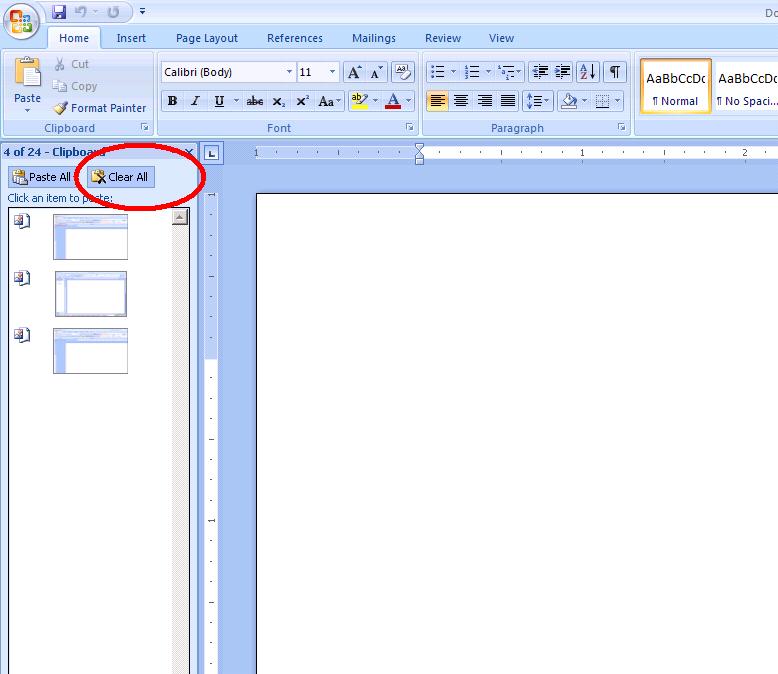
Copy-paste problem from Unix terminals to MS-Office products
A user walked into my office and told that he is able to copy-paste from Unix terminal (xterm) to mspaint, notepad etc but he can not do it on Microsoft Word. Upon a little research, I found somewhere that MS Office uses its own cache and the size of this cache is 4MB (it seemed to be an old article, but lets say it is still valid). So, I suggested user to clean-up his MS-Office cache and it did the magic. Following is a two step process to clean up the cache of MS-Office products.


Copy-paste not working in xterm
Ok, so many times users calls for their copy-paste problem. In some cases, it is resolvable problem while in other cases, it is just some cache-flush issue.
Here is my list of steps which may help:
1) Check for disk quota –It includes user’s home directory + the project he/she is working on. If any quota limit is over the limit, copy/paste will also not work!
2) Check for volume (if NFS location) or filesystem hosting above directories – If volume or filesystem is full, then also same problem.
3) Most interesting: If it is “xterm” related problem then ask user to use “SHIFT & select” and then paste. It does magic. The root cause is “When an application sets xterm to any of its mouse tracking modes, it reserves the unshifted mouse button clicks for the application's use. Unless you have modified the treatment of the shifted mouse button events (e.g., with your window manager), you can always do cut/paste by pressing the shift key while clicking with the mouse.”
Please feel free to add your own expertise to resolve the same problem in this list!
Here is my list of steps which may help:
1) Check for disk quota –It includes user’s home directory + the project he/she is working on. If any quota limit is over the limit, copy/paste will also not work!
2) Check for volume (if NFS location) or filesystem hosting above directories – If volume or filesystem is full, then also same problem.
3) Most interesting: If it is “xterm” related problem then ask user to use “SHIFT & select” and then paste. It does magic. The root cause is “When an application sets xterm to any of its mouse tracking modes, it reserves the unshifted mouse button clicks for the application's use. Unless you have modified the treatment of the shifted mouse button events (e.g., with your window manager), you can always do cut/paste by pressing the shift key while clicking with the mouse.”
Please feel free to add your own expertise to resolve the same problem in this list!
Subscribe to:
Posts (Atom)

 Posts
Posts


